As an Amazon Associate and an AliExpress affiliate, TechGurl earns from qualifying purchases. Some links on this page are affiliate links — if you buy through them we may receive a commission, at no extra cost to you. This never affects which products we cover or what we say about them.
Disclosure: This article contains affiliate links. If you buy through them we may earn a small commission at no extra cost to you.
If your smartwatch keeps disconnecting from your smartphone throughout the day, you are not alone. Missed notifications, failed fitness syncs, and sudden connection dropouts can turn a sophisticated wearable into a frustrating wrist ornament. While hardware defects can occasionally cause dropouts, the vast majority of disconnections stem from software conflicts, aggressive background battery optimization, operating system updates, or Bluetooth protocol stalls.
Understanding How Smartwatches Maintain Wireless Sync
Modern wearables rely primarily on Bluetooth Low Energy (BLE) to maintain an active tether to your phone without draining its battery in a few hours. According to the official Bluetooth SIG technical overview, BLE establishes persistent, low-bandwidth communication channels optimized for episodic data exchange such as heart rate telemetry and push notifications.
When a phone’s operating system aggressively suspends companion applications, or when physical interference weakens the radio signal, the BLE handshake fails. Understanding whether the breakdown happens at the operating system layer, the companion app layer, or the hardware radio layer is the key to solving the issue permanently.
Top Reasons Your Smartwatch Keeps Disconnecting
1. Aggressive Battery Optimization by the Mobile OS
By far the most common cause of spontaneous disconnection is the phone operating system terminating the companion app (such as Wear OS, Apple Watch app, Garmin Connect, or Fitbit) in the background. Android skins like Samsung One UI, Xiaomi MIUI/HyperOS, and OnePlus OxygenOS are notorious for freezing background processes to conserve power, which severs the connection to your wearable.
2. Outdated Firmware or Companion App Versions
Wearable companion apps require regular updates to maintain compatibility with system-level Bluetooth APIs. If your companion app or watch firmware falls behind, handshake errors and memory leaks will trigger random drops.
3. Bluetooth Cache and Pairing Glitches
Over time, cached Bluetooth connection keys and peripheral pairing profiles can become corrupted. This is particularly prevalent if you pair multiple wireless audio devices, car stereos, and wearables to the same smartphone simultaneously.
4. Physical Interference and Signal Range Limits
While standard Bluetooth covers roughly 30 feet (10 meters) in line-of-sight conditions, thick walls, dense metal structures, and crowded 2.4 GHz Wi-Fi environments can degrade the BLE radio packets enough to cause connection time-outs.
Step-by-Step Fixes When Your Smartwatch Keeps Disconnecting
Follow these proven troubleshooting steps in order to diagnose and resolve persistent dropouts on Android and iOS devices.
Step 1: Disable Background Battery Restrictions
Grant your companion application unconstrained permission to run in the background:
- On Android: Open Settings > Apps > [Companion App] > Battery, and switch the setting from ‘Optimized’ to ‘Unrestricted’. Also, lock the app in your recent apps tray so it is not cleared when you close running programs.
- On iPhone: Navigate to Settings > General > Background App Refresh, and ensure the toggle is active for your smartwatch companion app.
Step 2: Check Location and Bluetooth Permissions
BLE scanning on mobile platforms strictly requires nearby device and location permissions. If your companion app lost access to precise location or Bluetooth sharing during a recent OS patch, the link will drop whenever the phone locks. Verify under app permissions that Bluetooth and Nearby Devices are set to ‘Always Allow’.
Step 3: Clear Bluetooth System Cache (Android)
Clearing the phone’s internal Bluetooth stack eliminates corrupted connection profiles without deleting your personal files:
- Go to Settings > Apps.
- Tap the filter icon and select Show system apps.
- Find Bluetooth (or Bluetooth Legacy).
- Tap Storage > Clear Cache, then restart your smartphone.
Step 4: Unpair, Reset, and Re-establish the Bluetooth Bond
If simple cache clearing fails, perform a clean pairing reset:
- Open your phone’s Bluetooth settings menu.
- Select your smartwatch from the paired list and tap Unpair or Forget Device.
- Restart both your smartphone and your smartwatch.
- Open the companion app and initiate the pairing sequence from scratch rather than connecting directly via the phone’s generic Bluetooth menu.
Hardware Factors: When the Issue Is Environmental or Physical
If your smartwatch keeps disconnecting even after a full software reset, consider testing your hardware environment. Using smart home hubs, high-gain 2.4 GHz routers, or poorly shielded USB cables near your desk can cause severe packet loss on Bluetooth frequencies.
If you are looking to upgrade to a device with proven, rock-solid dual-band Bluetooth 5.3 connectivity, modern flagships offer dramatically better antenna design and multi-frequency resilience.
Samsung Galaxy Watch 6 — check today’s price
For iOS users, Apple’s proprietary W-series and S-series wireless chips offer tighter hardware-level integration with iPhones than third-party BLE trackers can match.
Apple Watch Series 9 — check today’s price
Handy tools on AliExpress
Diagnosing erratic connection drops or dirty charging ports on wearables is much easier with dedicated diagnostic gear.

Bug Detector RF Signal Detector Anti Tracking Strong Magnetic Detector For Wireless Audio
$127.73 $128.88 on AliExpress
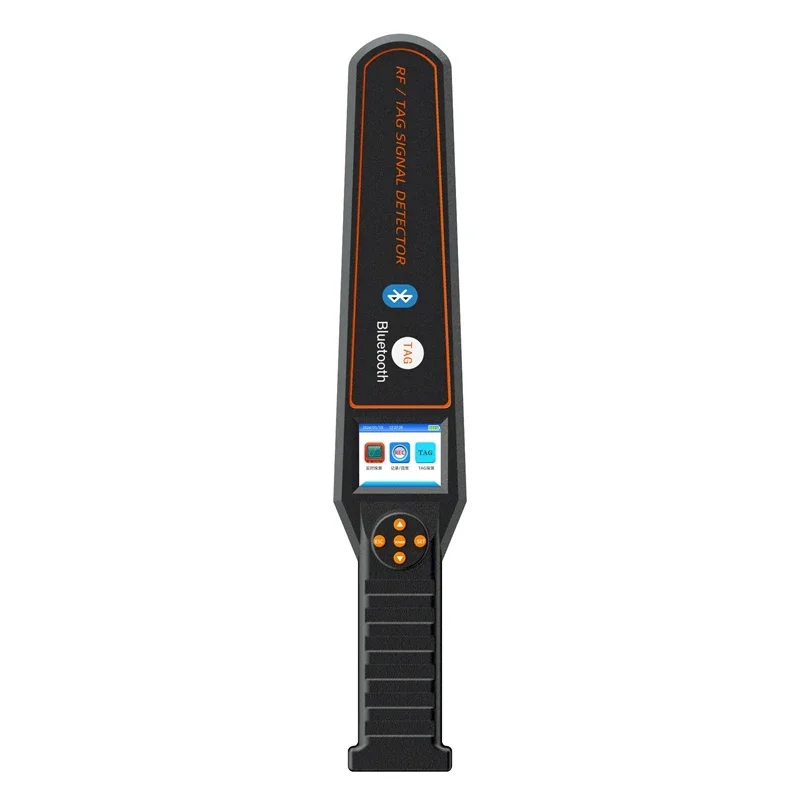
Portable RF/TAG Bluetooth Wireless GPS Tracker Detector DS828 Spy Hacking Gadgets Bug Scan
$122.05 on AliExpress
Common Mistakes to Avoid
- Pairing via phone Bluetooth settings instead of the companion app: Always initiate setup through the dedicated companion app so the proper data profiles register.
- Using third-party task killers or memory cleaners: Automated cleaning apps routinely terminate background watch services.
- Ignoring companion app updates: App developers regularly deploy critical hotfixes for connection drop bugs.
- Running extreme battery saver modes: Low Power Mode on iOS and Battery Saver on Android intentionally throttle BLE polling intervals.
Frequently Asked Questions
Why does my smartwatch disconnect when the phone screen turns off?
This is almost always caused by your smartphone’s operating system suspending background tasks when the display is locked. Adjust your companion app’s battery usage to ‘Unrestricted’ and enable ‘Background App Refresh’ to keep the process alive.
Can having multiple Bluetooth devices cause my watch to disconnect?
Yes. Smartphones can handle multiple paired connections, but bandwidth-heavy devices like Bluetooth LE Audio earbuds or car head units can congest the Bluetooth controller, occasionally dropping low-priority data beacons from your watch.
Does airplane mode reset a stuck smartwatch connection?
Toggling Airplane Mode on your phone for 10 seconds is an effective quick-fix because it completely power-cycles the mobile cellular, Wi-Fi, and Bluetooth radio stacks, forcing a fresh BLE handshake upon reactivation.
Conclusion
Dealing with a wearable that constantly drops its signal is frustrating, but fixing it rarely requires buying new hardware. By disabling aggressive battery optimization, resetting the Bluetooth cache, and ensuring proper companion permissions, you can permanently resolve why your smartwatch keeps disconnecting. For more detailed hardware teardowns and troubleshooting walkthroughs, explore our How to Fix a Wireless Charger That Stopped Working to keep all your daily tech running smoothly.