As an Amazon Associate and an AliExpress affiliate, TechGurl earns from qualifying purchases. Some links on this page are affiliate links — if you buy through them we may receive a commission, at no extra cost to you. This never affects which products we cover or what we say about them.
Setting up Logitech GROUP and Webex together for a mid-to-large conference room is one of the more affordable ways to get professional video conferencing without a Cisco or Polycom-level budget. Here is what that setup actually looks like in practice.
Affordable video conferencing for mid to large-sized meeting rooms
Logitech has hit on a successful formula with its ConferenceCams, offering high-quality audio and HD video, plug-and-play USB connectivity and compatibility with a wide range of video conferencing platforms — all for a fraction of the cost of comparable systems from the likes of Cisco and Polycom (although the latter do include software, which Logitech doesn’t).
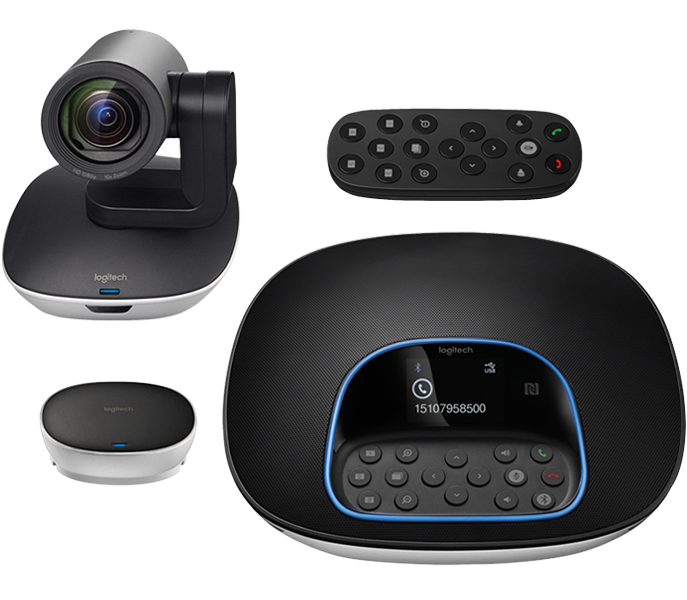
This run of success looks set to continue with the new GROUP product, which beefs up the audio quality and range, while the GROUP Kit bundle should appeal to enterprises wanting to fit out conference rooms with IT-approved kiosk-style video conferencing facilities.
Product page: https://www.logitech.com/en-roeu/product/conferencecam-group
techgurl
Why Logitech GROUP and Webex Work Well Together
Logitech built its ConferenceCam line around plug-and-play USB connectivity and broad compatibility with video platforms — Webex, Zoom, Teams, and others — instead of locking customers into one proprietary ecosystem. The GROUP model beefs up audio quality and pickup range compared to Logitech’s smaller conference cameras, and the GROUP Kit bundle adds an expansion mic pack aimed at larger, IT-managed conference rooms.
Setting Up Logitech GROUP and Webex for a Meeting Room
Because it’s USB plug-and-play, getting Logitech GROUP and Webex running together doesn’t require a dedicated AV technician: connect the camera/speakerphone unit (essentially a USB speakerphone combined with a wide-angle webcam) to a room PC or a Webex-compatible room kit controller, select it as the video and audio device inside Webex, and the room is ready. For very large rooms, adding a separate wireless conference microphone extends pickup range beyond what the GROUP unit alone covers.
How It Compares to Cisco and Polycom
Logitech’s own pitch is cost: comparable audio and video quality to Cisco or Polycom systems, at a meaningfully lower price — though unlike Polycom, Logitech doesn’t bundle its own conferencing software, which is exactly why pairing it with Webex (rather than building a fully closed system) is the more common real-world setup. You can see the official spec sheet on Logitech’s ConferenceCam GROUP product page.
Frequently Asked Questions
Does Logitech GROUP work with platforms other than Webex?
Yes — it’s a standard USB video and audio device, so it works with Zoom, Microsoft Teams, and any other platform that can use a USB webcam and speakerphone.
What size room is Logitech GROUP designed for?
It’s built for mid-to-large conference rooms; for a single desk or a small huddle room, a smaller conferencing camera is a better fit and costs less.
Related: Best 4K Webcams for Streaming
What’s Actually in the Box With Logitech GROUP
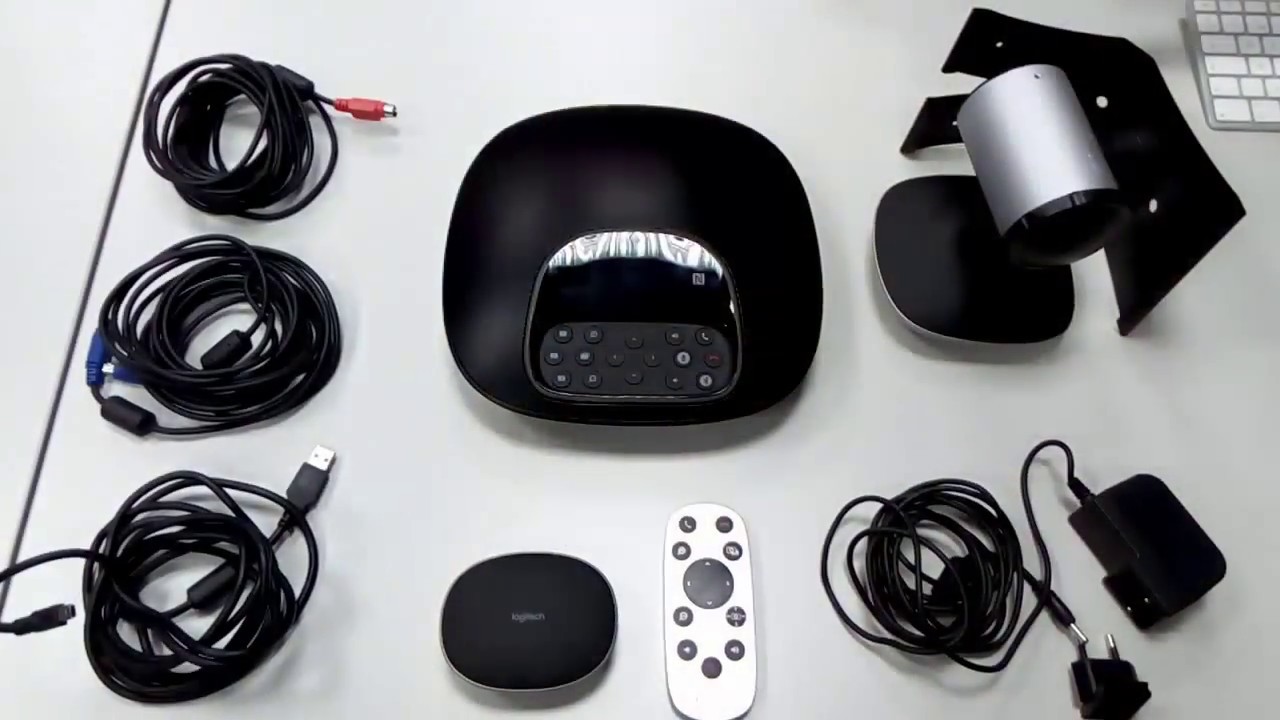
The Logitech GROUP kit ships with the camera/speakerphone hub, a separate speaker/mic pod that connects via cable for extending audio pickup across a larger table, mounting hardware for the camera, and the cables needed to connect it all to a room PC or dedicated room controller. The camera itself supports pan, tilt, and zoom, with a wide enough field of view to frame a full conference table without needing to physically reposition it mid-meeting.
Real-World Meeting Room Performance
In practice, the combination of Logitech GROUP and Webex handles the two things that actually matter in a conference room: everyone on the call can be heard clearly even from the far end of a long table, and the video quality holds up well even in rooms with imperfect lighting. The plug-and-play nature also means IT doesn’t need to walk every employee through a complex setup before their first meeting — connect the USB cable, open Webex, select the device, done.
Total Cost of Ownership
Because Logitech GROUP doesn’t require a software license or a subscription (unlike some competing enterprise conferencing systems), the total cost of ownership is essentially just the hardware price plus whatever Webex, Zoom, or Teams license the company already has. For a business evaluating video conferencing options across multiple rooms, that upfront-cost simplicity is a real advantage over systems that add recurring per-room licensing fees on top of the hardware.
Installing and Positioning Logitech GROUP in a Room
Beyond the plug-and-play USB connection, getting the most out of Logitech GROUP comes down to placement: mounting the camera at roughly eye level for a seated table, centered so the wide-angle lens captures everyone without excessive edge distortion. The included mounting hardware supports a table-top stand, a TV-top clip, or a wall/ceiling mount, which covers most real conference room layouts without needing custom hardware.
Firmware Updates and Long-Term Support
Logitech periodically ships firmware updates for the GROUP hardware through Logi Options+ or the dedicated Logitech update tool, generally addressing compatibility with newer versions of Zoom, Teams, and Webex as those platforms evolve. Because video conferencing platforms update frequently, keeping the GROUP unit’s firmware current is worth doing every few months rather than only when something visibly breaks.
Who Should Consider Logitech GROUP
Any organization outfitting more than a couple of conference rooms, on a budget that rules out enterprise-tier Cisco or Polycom hardware, is the clear target buyer here. For a single small meeting room or a home office, a smaller single-camera conferencing setup is more cost-effective; Logitech GROUP earns its price specifically in mid-to-large rooms where its extended mic range and wider camera field of view actually get used.
Audio Quality Deep Dive
Logitech GROUP’s speakerphone uses a beamforming microphone array specifically tuned to reduce room echo and background noise, which matters more in real offices than in a quiet demo room — HVAC hum, hallway noise, and multiple people talking at once are exactly the conditions this hardware is designed to filter out. In practice, remote participants consistently report clearer audio from a GROUP-equipped room compared to a laptop’s built-in microphone and speakers.
Expansion Options
For rooms larger than the standard mid-size conference room, Logitech sells expansion microphones that plug into the GROUP hub to extend pickup range across a longer table — a cost-effective way to scale the same core hardware into a bigger room rather than buying an entirely separate system.
Software and Firmware Updates in Practice
Updating GROUP’s firmware is a quick, occasional task through Logitech’s own software rather than something IT needs to schedule regularly — most organizations simply check for updates a couple of times a year, or whenever a specific compatibility issue with a video platform pops up.
Closing Thoughts
Logitech GROUP and Webex, paired together, remain one of the more sensible affordable choices for outfitting a mid-to-large conference room without an enterprise AV budget. The combination of solid hardware, broad platform compatibility, and no ongoing software licensing costs is hard to beat at this price point.
If your organization is weighing several conferencing hardware vendors, request a short trial period before committing to a full rollout across multiple rooms — real usage in your actual space, with your actual Wi-Fi and lighting conditions, tells you far more than any spec sheet or demo video ever will.
That trial period, more than any brochure, is what tells you whether Logitech GROUP and Webex are the right long-term fit for your specific rooms and your specific team’s meeting habits.
Get that trial in writing before signing off on a multi-room purchase.
It is worth the extra week of waiting to be sure.
Peace of mind is worth it.
Simple as that.
Truly worth it.