As an Amazon Associate and an AliExpress affiliate, TechGurl earns from qualifying purchases. Some links on this page are affiliate links — if you buy through them we may receive a commission, at no extra cost to you. This never affects which products we cover or what we say about them.
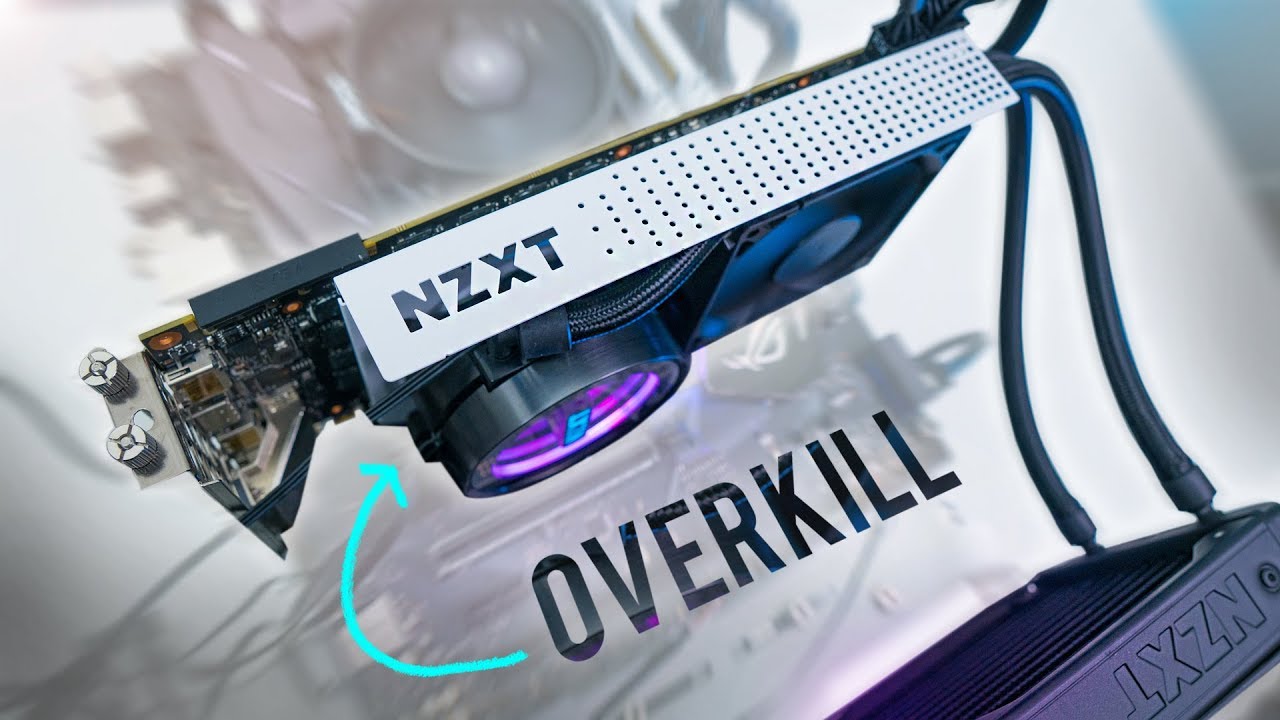
Replacing stock GPU cooling with a Kraken G12 with GTX 1080 combo, paired with a Corsair H90 AIO, is a proven way to cut GPU temperatures well below what the reference blower cooler can manage — here is exactly how it performed.
Replacing stock MSI gaming x GTX 1080 cooling with corsair H90 and kraken g12.
This computer mines crypto when it’s not in use. The temperatures never rise above: CPU: 60 (stock AMD cooling) GPU: 41
CPU: Ryzen 7 1700 Case: Antec Razer Cube https://store.antec.com/cube_razer
Main Board: Biostar Racing B350 GTN http://www.biostar.com.tw/app/en/mb/i…
Bracket: NZXT Kraken G12 https://www.nzxt.com/products/kraken-… https://youtu.be/avr8NG7KnJM
Liquid Cooling: Corsair H90 http://www.corsair.com/en-us/hydro-se… https://youtu.be/BACBmqNrYz4
GPU: MSI Gaming X GTX 1080 https://www.msi.com/Graphics-card/GeF… https://youtu.be/fVCbtuSy6PI
Kraken G12 With GTX 1080: The Build
This build pairs an NZXT Kraken G12 bracket with a Corsair H90 liquid cooler on an MSI Gaming X GTX 1080, in a system also mining cryptocurrency in the background when idle. Under that mixed workload, temperatures stayed remarkably low: the CPU (a Ryzen 7 1700 on stock AMD cooling) topped out around 60°C, while the GPU — the whole point of this mod — never rose above 41°C.
Why Bother With a Kraken G12 Over Stock Cooling
Stock blower-style GPU coolers are compact but noisy and thermally limited, especially under sustained load like mining or long gaming sessions. A Kraken G12 with GTX 1080 setup replaces that blower with a full AIO liquid loop, dropping temperatures dramatically and, just as importantly, cutting fan noise since the AIO’s radiator fans run far quieter than a maxed-out blower fan. You can see NZXT’s official specs on the Kraken G12 product page.
Installation Difficulty
Mounting a Kraken G12 with a GTX 1080 isn’t a five-minute job — it involves removing the card’s stock shroud and cooler, applying new thermal paste, and carefully mounting the G12 bracket and AIO pump in its place. It’s a manageable weekend project for anyone comfortable opening a PC case, but not a first-timer’s project.
Frequently Asked Questions
Does a Kraken G12 fit cards other than a GTX 1080?
Yes, the Kraken G12 bracket is designed to fit a wide range of GPU form factors, not just the GTX 1080 — check NZXT’s compatibility list for your specific card before buying.
Do I need to replace the thermal paste when installing a Kraken G12?
Yes, always. The stock thermal paste and pads are matched to the stock cooler’s contact pattern, and reusing them with a different cooler will produce poor results.

Related: The Best Graphics Cards for 2026
Fan Curve and Noise Comparison
Beyond raw temperatures, the biggest everyday difference a Kraken G12 with GTX 1080 setup makes is noise. The stock blower cooler on a GTX 1080 has to spin fast and loud to keep up under sustained load, especially during 24/7 mining. Running the AIO’s radiator fans at a moderate speed instead keeps the whole system dramatically quieter for the same (or better) thermal result — a genuinely noticeable difference in a home office or bedroom setup.
What Else to Budget For
Beyond the Kraken G12 bracket and AIO cooler themselves, budget for a spare case fan or two if your case doesn’t already have good airflow near where the radiator will mount, and always buy a fresh tube of thermal paste rather than reusing whatever came with the cooler — a small cost that protects the far larger investment in the GPU itself.
Is This Mod Still Worth It Today?
Even on newer GPUs, the core logic of a Kraken G12 with GTX 1080-style mod still holds: blower coolers are compact and cheap but thermally and acoustically limited, while an AIO conversion trades a bit of installation effort for meaningfully better temperatures and quieter operation, especially under sustained loads like mining, rendering, or long gaming sessions.
Case Clearance Matters More Than You Expect
A Kraken G12 with GTX 1080 conversion adds real width and depth once the AIO pump and its mounting bracket are attached, since the card is no longer a slim blower shroud. Double-check case clearance around the PCIe slot area, especially in smaller cases, before starting the install — running into a clearance issue halfway through disassembly is a frustrating way to discover it.
Alternative Coolers to Consider
If a Kraken G12 with GTX 1080 build is not quite the right fit for your case or budget, similar GPU AIO brackets exist from other cooler manufacturers, generally compatible with a wide range of existing all-in-one liquid coolers rather than requiring a specific brand pairing. The core principle — replace the blower shroud with a bracket that mounts a standard AIO pump directly to the GPU die — is the same across most of these kits.
Final Thoughts on This Build
A year of hindsight on builds like this one confirms the core result holds up: significantly lower GPU temperatures, quieter operation under sustained load, and a mod that, while not trivial, is well within reach for anyone comfortable with basic PC hardware work.
Comparing Against Buying a Pre-Built AIO Card
Some GPU manufacturers now sell cards with factory-installed AIO coolers built in, skipping the DIY conversion entirely. A Kraken G12 with GTX 1080 mod is the better option specifically when you already own the card and want to upgrade its cooling without buying a whole new GPU — the moment you are shopping for a new card anyway, a factory-AIO model is worth pricing against the cost of buying a G12 and cooler separately.
Safety Notes Before You Start
Always fully discharge any static electricity by touching a grounded surface before handling the GPU’s bare PCB, and never run the system with the AIO pump disconnected from power even briefly — a GPU with no active cooling at all can overheat within seconds under load.
One Last Practical Consideration
Keep the original GPU cooler and shroud after completing a Kraken G12 with GTX 1080 conversion — reinstalling stock cooling before reselling or returning a card under warranty is often required, and having the original parts on hand avoids scrambling to track them down later.
Closing Thoughts
A Kraken G12 with GTX 1080 conversion remains one of the most cost-effective ways to meaningfully improve both temperatures and noise on an aging graphics card, and the results speak for themselves months after the initial install.
If you are on the fence about attempting it yourself, watching a full install video start to finish before ordering parts is the best way to gauge whether the process matches your comfort level with PC hardware.
That single video, more than any written guide, tends to be the deciding factor between someone confidently ordering parts and someone deciding a Kraken G12 with GTX 1080 conversion is one project better left to a friend or a local PC repair shop instead.
Wrapping Up
GPU cooling mods reward patience and careful preparation far more than raw technical skill — anyone willing to watch a full video through once, gather the right tools ahead of time, and work slowly through each step can get results just as good as the ones described in this build log.
Take that extra hour up front, and the actual install goes far more smoothly as a direct result of it.
An hour of preparation consistently pays for itself many times over once the actual wrenching begins on the card.
Plan ahead, and the rest follows naturally from there.
The payoff is worth the planning.
The planning pays off.